Short Links: A Full URL Shortener, Built Into Your QR Codes
Every **UQR** account now includes a proper URL shortener. Create branded short links with the same analytics engine your QR codes use — clicks, referrers, UTM parameters and unique visitors on every plan — then pair any link with a QR code in one click. And like everything here, your links never expire.
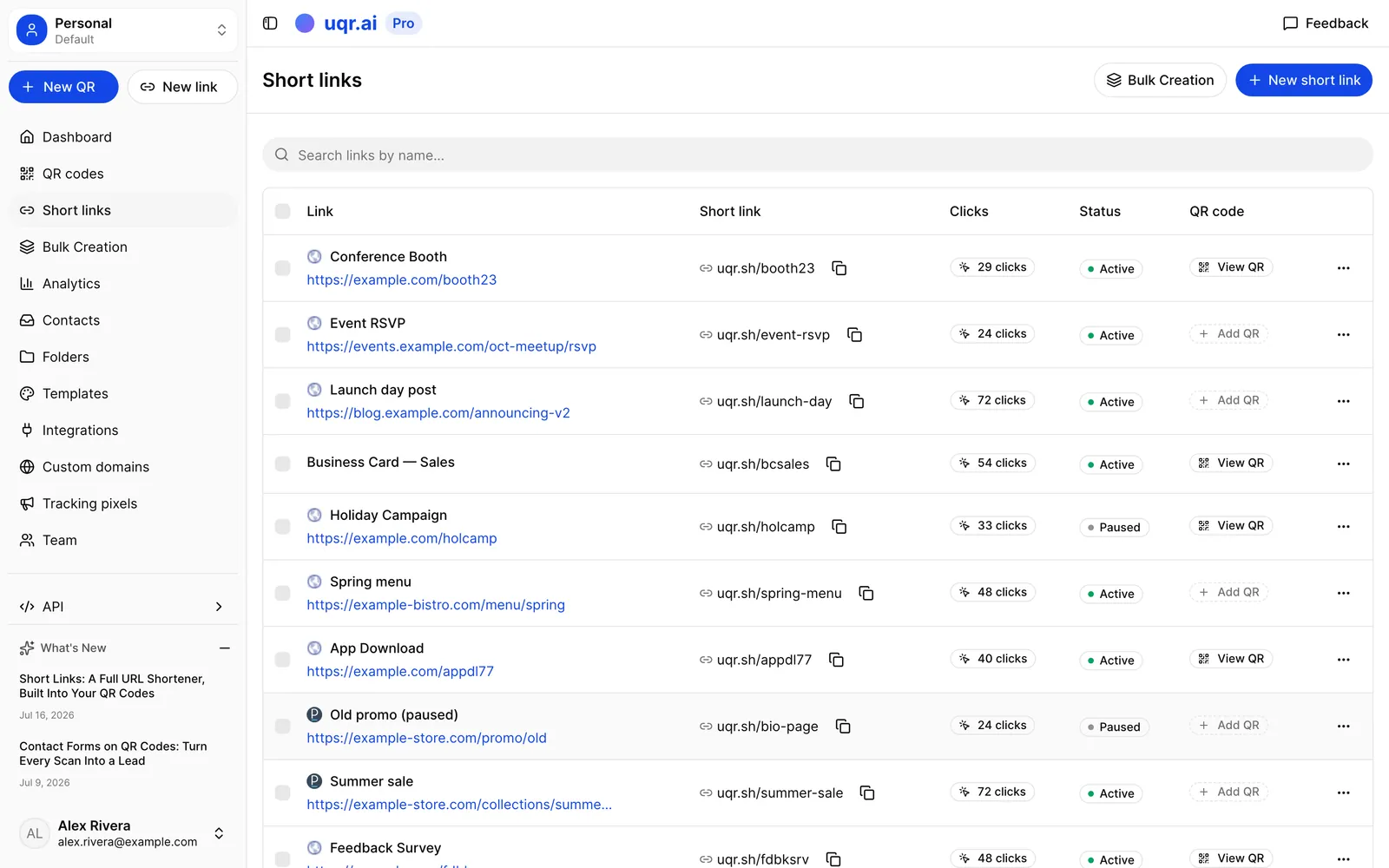
A QR code has always been two things wearing one coat: a square you print, and a short link underneath it doing the actual work. Every dynamic code you've made on UQR already routes through a short URL — that's what makes the destination editable and every scan measurable. But the link half was never something you could use on its own. If you wanted to share a clean, trackable URL in an email, a link-in-bio page, a WhatsApp message or an ad, you had to generate a QR code you didn't need just to get one.
Short links fix that. You can now shorten any URL directly — no QR code required — and manage your links in their own dashboard, with their own quota-friendly workflow and the full analytics engine behind them. Paste a long URL, get back something like uqr.page/summer-sale, and share it anywhere a camera can't reach. When you do want the printable half, any link becomes a fully designed QR code in one click.
One engine for links and QR codes
Short links aren't a bolted-on side product. They run on the same infrastructure as your dynamic QR codes, which means everything you already rely on carries over:
- Editable destinations. Change where a link points anytime — the short URL itself never changes, so the version in old emails and bios keeps working.
- The same analytics. Every click is recorded exactly like a scan: country and city, device, browser and OS, over time.
- One-click QR pairing. Every link row has an Add QR code action. The generated code shares the link's URL and analytics, and doesn't use up an extra slot.
- Separate attribution. When a link has a QR code attached, analytics tell you which visits came from scanning the printed code and which came from clicking the link — so you can finally answer "did the poster work, or was it the newsletter?"
Shorten a URL in seconds
There are two ways in. The fastest is the shortener on the short links page — paste a URL, hit shorten, and copy the result. The full editor lives in your dashboard under Links, where you can also name the link, and, on Lite and up, choose your own custom back-half — up to 64 characters, so uqr.page/spring-menu instead of a random string.
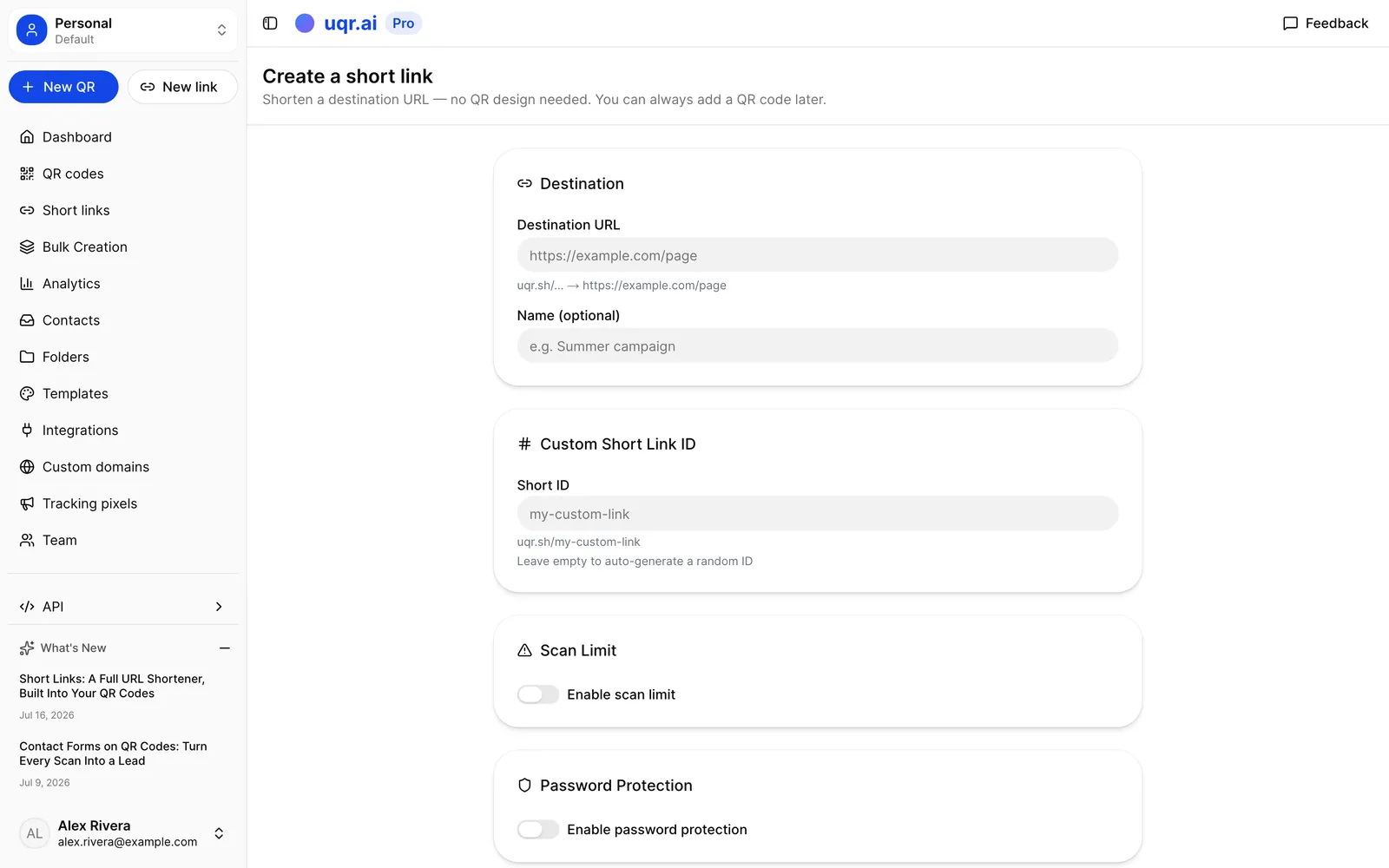
Note Pick your back-half with care: the destination is editable forever, but the short URL itself is permanent once created. That's a feature — a link you've already shared can never silently start pointing somewhere else because of a rename.
From the same editor you can pause and resume a link, duplicate it as a starting point for the next campaign, and — on Pro and Business — manage links in a shared team workspace.
Click analytics on every plan, with no recording caps
Every short link gets the full stats page: clicks over time, unique visitors, countries and cities, devices, browsers and operating systems — plus three views built for link traffic:
- Referrers — which sites and apps actually send you clicks.
- Traffic source — QR scans vs. link clicks, per visit.
- UTM parameters — tag your short URL (
?utm_source=newsletter) and the values are recorded with every click and included in your CSV export, ready for a spreadsheet or your BI tool.
Unique visitors are counted the privacy-respecting way: a daily-rotating, salted fingerprint with no cookies — raw IP addresses are never stored. Bots don't count as visitors, live visitors from the last five minutes show up in an online now counter, and you can export any date range to CSV or share a read-only stats dashboard with a public URL (optionally behind a password).
And a policy worth spelling out: clicks are recorded on every plan, with no recording caps. Some link tools stop counting after a few hundred clicks unless you upgrade. Here, whether you're on Free or Business, every visit lands in your stats.
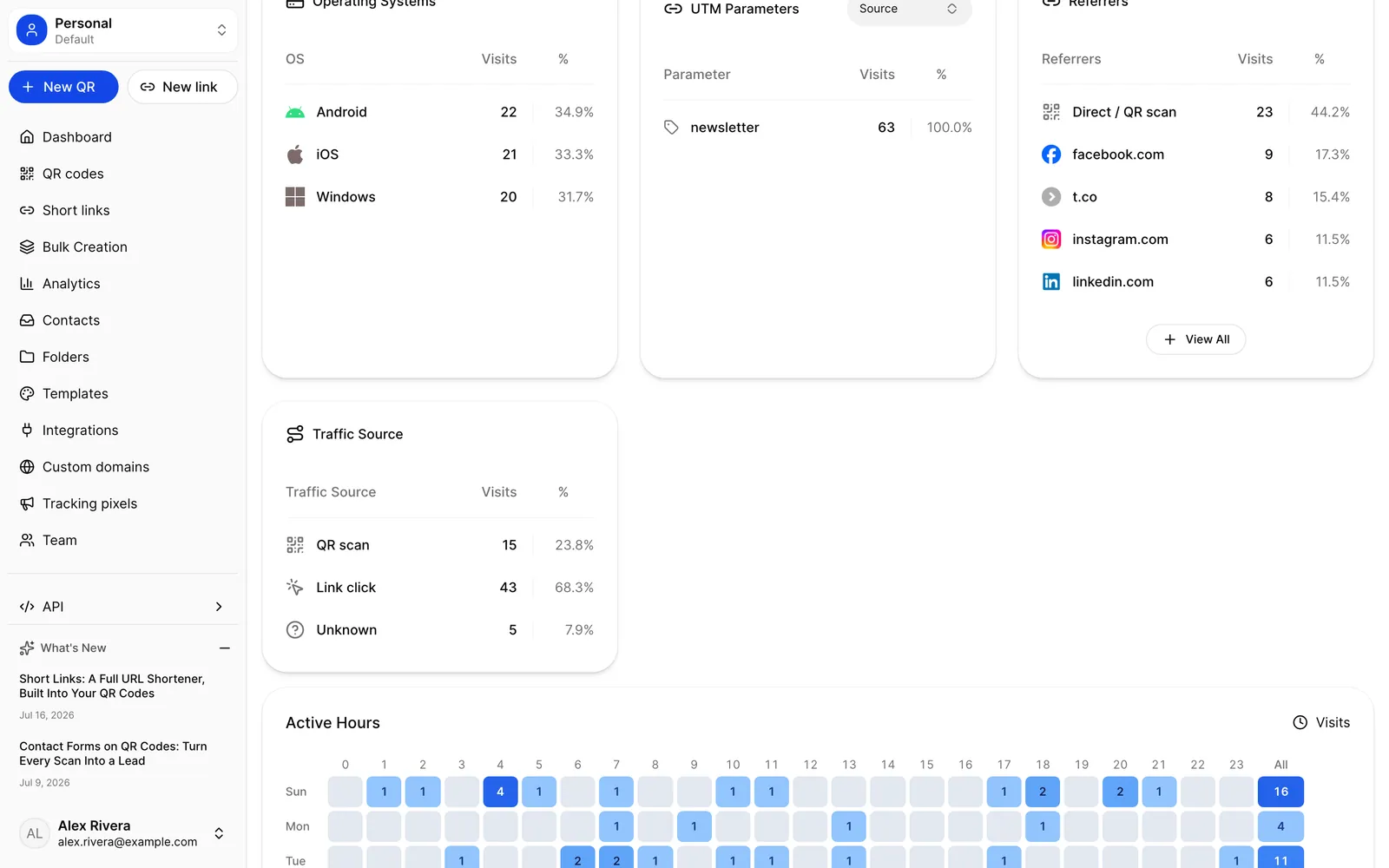
Tip Create one short link per channel for the same destination — newsletter, bio, printed QR. Each link's stats then read as a clean channel report, and the Traffic Source chart separates scans from clicks within each.
Your brand on every link
On Pro and up, you can serve short links from your own subdomain — qr.yourbrand.com/launch instead of the default domain. Add the subdomain in your dashboard, point a single CNAME record at us, and verification runs automatically; your existing links stay reachable on the default domain throughout. A branded domain makes links recognizably yours, which is exactly what you want on packaging, ads and invoices.
Redirects themselves stay clean on every plan: no interstitial pages, no branding injected on the way through, and analytics recording happens after the redirect is sent, so tracking never slows your visitor down. Shared links also unfurl properly on social — your short link previews with the destination page's own title, description and image.
Control who clicks, and when
The link options you may know from dynamic QR codes apply to standalone links too:
- Click notifications (Lite and up) — an email the moment a link is visited, or a daily digest.
- Password before opening (Pro) — require a password before the link redirects.
- Expiration and visit limits (Pro) — optionally set an end date or a maximum number of visits, with a custom redirect for anyone who arrives after. Off by default; links never expire on their own.
- Geolocation redirects (Pro) — send visitors from different countries to different destinations from one short link.
- Tracking pixels (Pro) — fire your GA4, Google Ads or Meta pixels on link clicks. Pixels are automatically skipped for bots and for visitors in the EEA and UK, so you stay on the right side of consent rules by default.
Links that never expire — and one honest number
Short links and dynamic QR codes draw from one shared pool of active slots: 5 on Free, 25 on Lite, unlimited on Pro and Business. Hitting the cap only stops you from creating new links — it never touches the ones you have. Existing links keep redirecting, keep recording clicks, and survive downgrades. The only things that stop a link are you pausing it, or our abuse team removing something that violates the rules.
| Free | Lite | Pro | Business | |
|---|---|---|---|---|
| Active links + dynamic QR codes (shared pool) | 5 | 25 | Unlimited | Unlimited |
| Click analytics, recorded on every visit | Included | Included | Included | Included |
| Custom back-half (your own slug) | Not included | Included | Included | Included |
| Click notifications | Not included | Included | Included | Included |
| Password, expiry, visit limits, geo redirects | Not included | Not included | Included | Included |
| Custom branded domain | Not included | Not included | Included | Included |
| REST API access | Not included | Not included | Included | Included |
For developers, the Pro plan's REST API covers links end to end: create, list, update and delete them programmatically — custom slugs and link options included — and read back clicks_count and unique_visitors per link, the same way the QR code API works today.
Key takeaways
- Every UQR account now includes a standalone URL shortener — share trackable short links anywhere, no QR code required.
- Links get the full analytics engine on every plan: clicks, unique visitors, geography, devices, referrers, UTM parameters and CSV export, with no click-recording caps.
- Any link becomes a designed QR code in one click, and analytics attribute scans and clicks separately.
- Destinations are editable forever; the short URL is permanent, and links never expire on their own.
- Lite unlocks custom back-halves and click notifications; Pro adds passwords, expiry, geo redirects, pixels, branded domains, and the API. Business adds bulk creation.
Ready to shorten your first link? Paste a URL on the short links page to try it, create a QR code for the printable half, or compare plans to see which tier fits your links.