Contact Forms on QR Codes: Turn Every Scan Into a Lead
Add a contact form to your List-of-links and vCard QR pages and collect visitor names, emails and phone numbers straight into your Contacts dashboard. A poster, a product label or a business card becomes a lead-capture channel — with an email the moment someone submits.
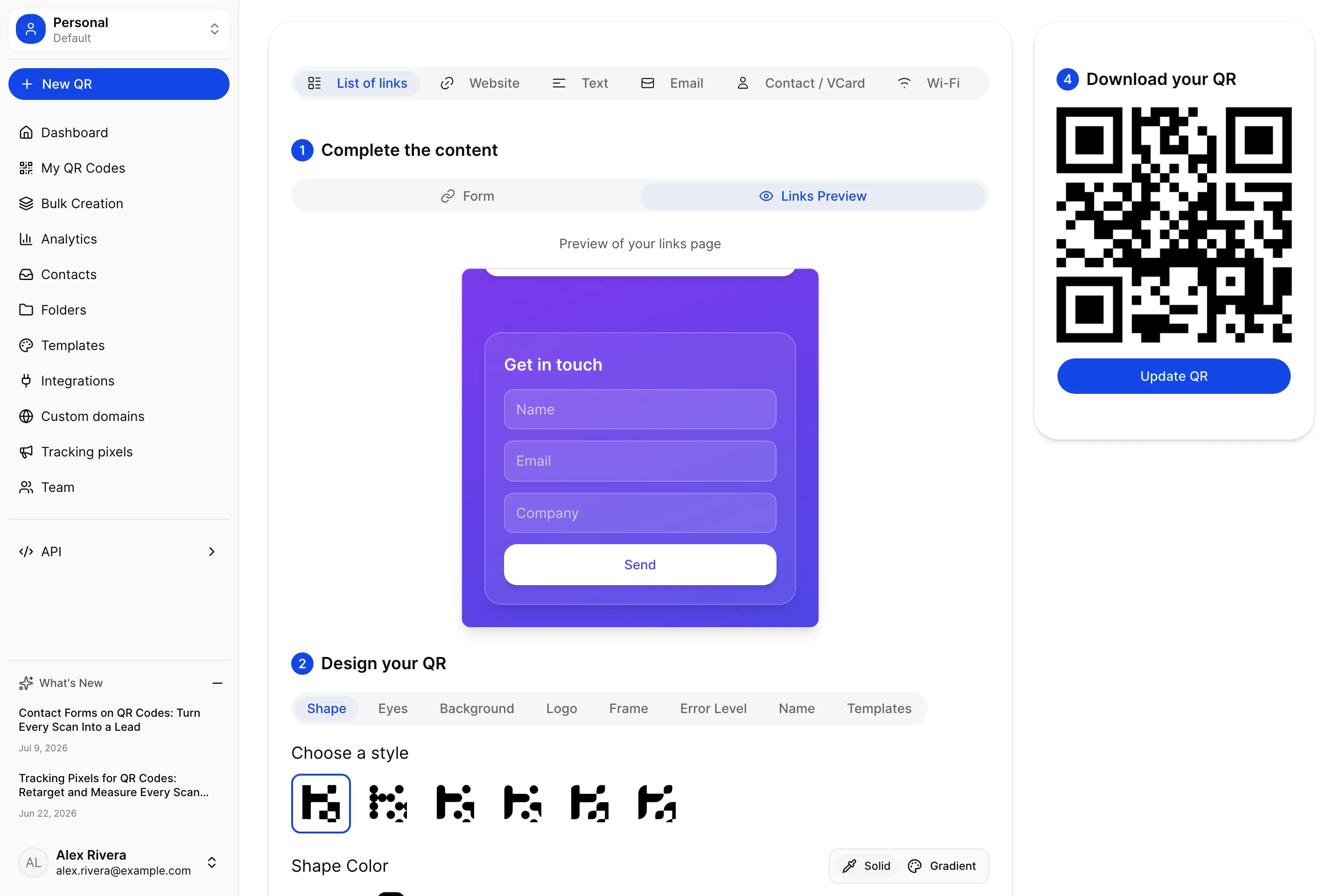
A QR code is a bridge between the physical world and the digital one. Someone spots your poster, your packaging, your booth banner, or your business card — and a scan later they are standing on your landing page. It is a genuine moment of interest, from a real person, right now. And for most QR codes, that moment ends the same way: the visitor looks around, maybe taps a link, and leaves. You were never introduced. You have no idea who they were.
Contact forms fix that. Add a form to your QR landing page and the visitor can leave you their name, email and phone number before they go — and that lead lands straight in your Contacts dashboard, with an email in your inbox the moment they submit. The flyer on a café table becomes a mailing list. The code on your packaging becomes a warranty-registration channel. The scan stops being anonymous and starts being a contact you can follow up with.
What a contact form does on a QR code
When you enable a contact form, UQR adds a clean "Get in touch" card to your hosted QR page — the List-of-links or vCard landing page your dynamic code already points to. A visitor fills it in, taps Send, and three things happen:
- The submission is saved to your Contacts dashboard, tied to the exact QR code it came from.
- You get an email notification with the lead's details, so you can respond while their interest is fresh.
- The visitor sees a friendly confirmation message and carries on.
No third-party form builder, no embed code, no separate tool to wire up. The form lives on the page your QR already serves, and every lead is yours.
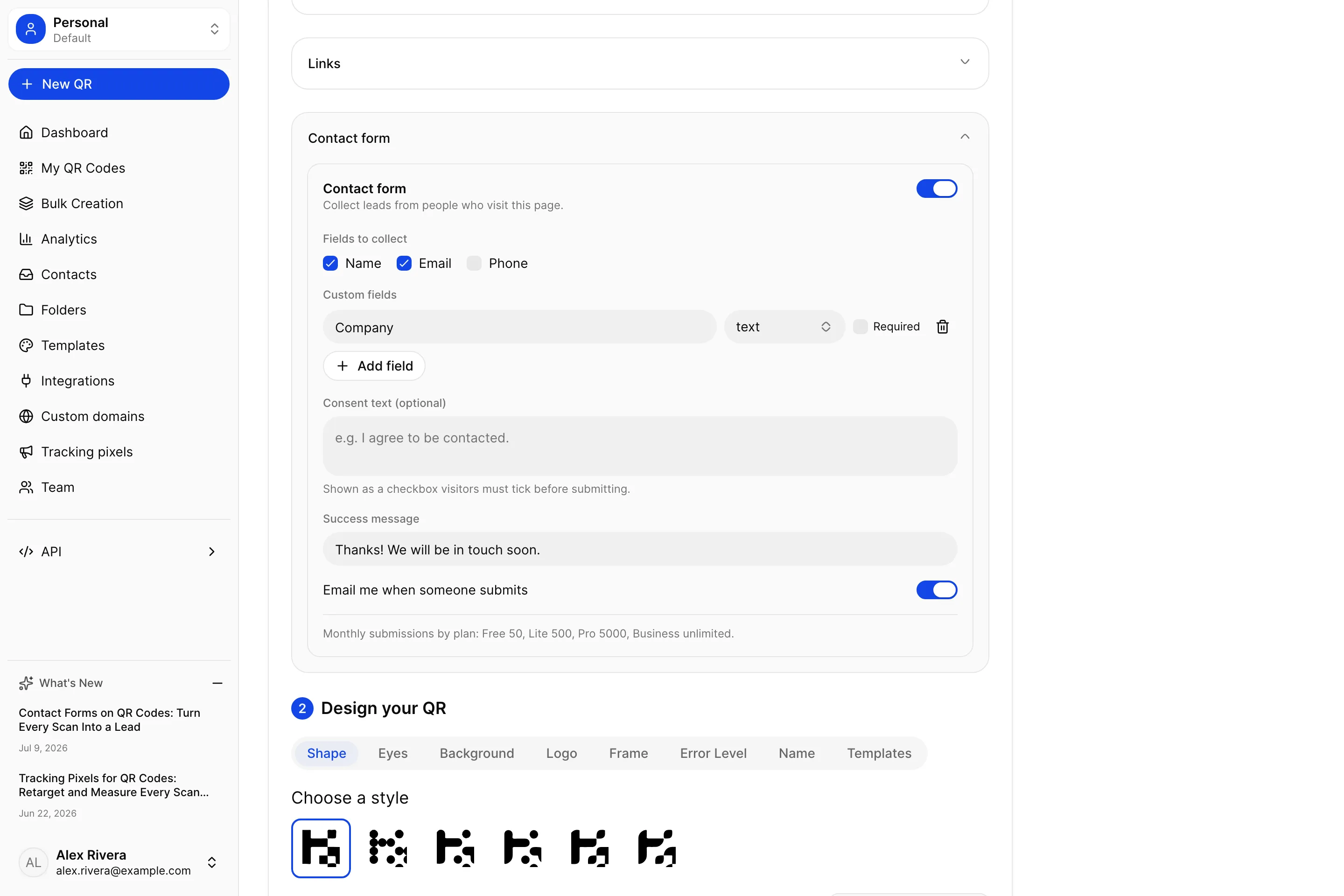
Build the form in seconds
The form builder sits right inside the List-of-links and vCard editors, alongside your links, colors and images. Flip Contact form on and choose what to collect:
- Standard fields — toggle Name, Email and Phone on or off.
- Custom fields — add your own questions ("Company", "How did you hear about us?", a message box) as text, number or paragraph inputs, and mark any of them required.
- Consent line — add a short consent sentence with a required checkbox, so you collect leads on the right side of privacy law.
- Success message — write the thank-you the visitor sees after they submit.
- Notifications — keep the per-submission email on, or turn it off for high-volume forms.
Everything is optional except a single contact detail, so a form can be as short as one email field or as rich as a full intake questionnaire.
It matches your page automatically
A lead form only converts if it looks like it belongs. So the form inherits your page's theme — its background, text color and button color all come from the design you already chose for that QR page (as in the frosted purple card at the top of this post). Put a form on a dark, gradient landing page and it renders as a frosted card with light text; put one on a bright page and it adapts the other way. You style the page once, and the form follows.
Note Contact forms work on dynamic UQR landing pages — the List-of-links and vCard types, the same codes you can edit anytime without reprinting. A static QR encodes its destination directly and never routes through a page we host, so there is nowhere for a form to live. Dynamic codes are what make lead capture from print possible.
Every lead in one place
New submissions collect in your Contacts dashboard — a single, searchable list of everyone who has filled in a form across all of your QR codes. Each row shows the name, email and details, the QR code it came from, and when it arrived. You can search across contacts, filter by QR code, and page through as many as you have.
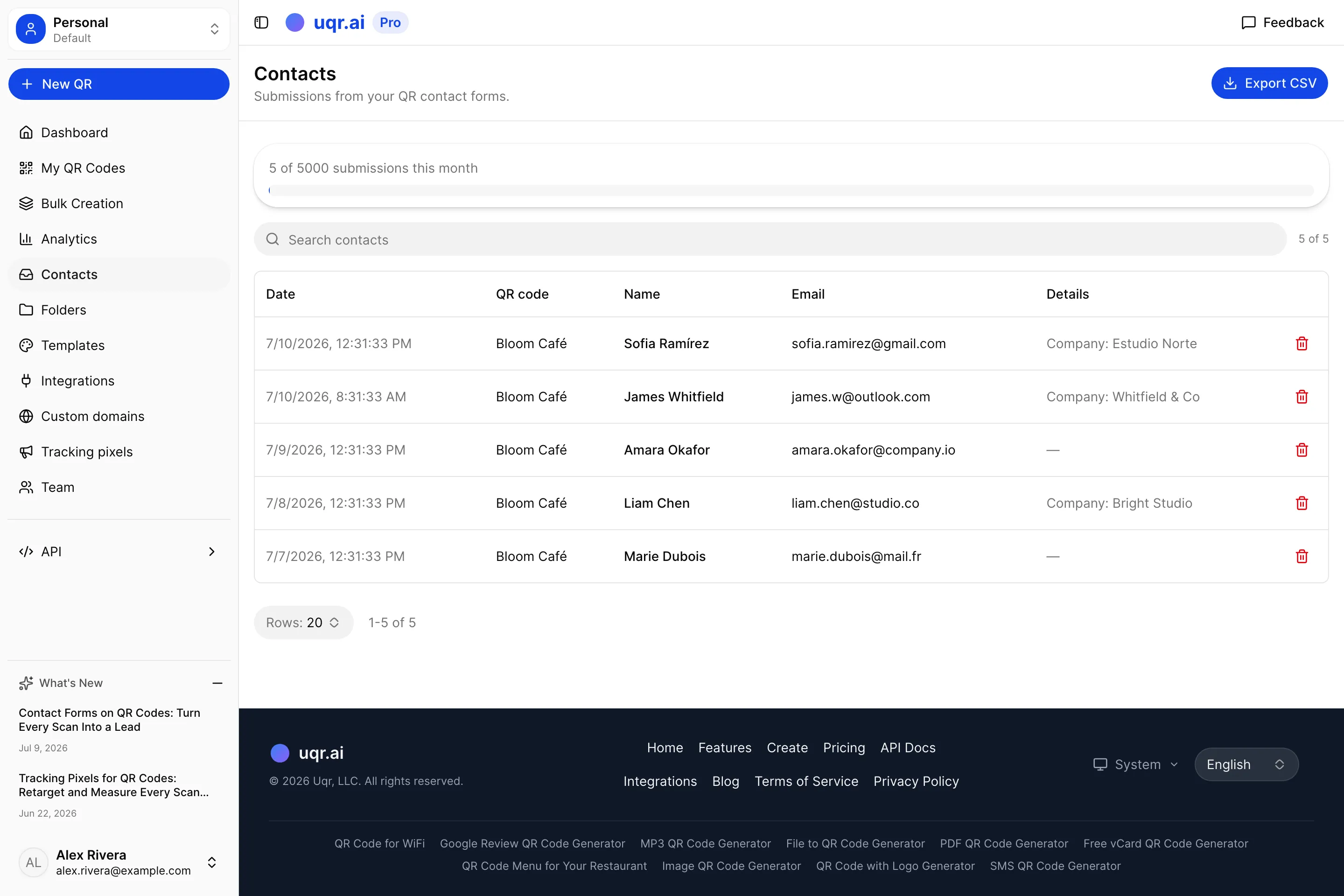
On Pro and above, you can export your contacts to CSV in one click — ready to drop into your CRM, your email tool, or a spreadsheet.
On every plan, and you never lose a lead
Contact forms are available on every plan, including Free. What changes by plan is how many leads you can view each month:
| Free | Lite | Pro | Business | |
|---|---|---|---|---|
| Contact forms | Included | Included | Included | Included |
| Leads visible per month | 50 | 500 | 5,000 | Unlimited |
| Email notification on each lead | Included | Included | Included | Included |
| Export contacts to CSV | Not included | Not included | Included | Included |
| Custom fields, consent line, themed form | Included | Included | Included | Included |
Here is the important part: every submission is always captured and stored, even past your monthly limit. If a busy month pushes you over your plan's cap, the most recent leads beyond it are simply held out of view — never deleted. The moment you upgrade, they unlock. You will never lose a lead to a limit.
Tip Building an integration? Pro and above can also read submissions through the REST API at
GET /api/v1/contacts, so new leads can flow straight into your own systems. See the API docs for details.
A few ways to use it
The feature is simple; the plays it unlocks are not.
- Turn a poster into a mailing list. Put a List-of-links code with a contact form on an event flyer or a shop-window poster. Everyone who scans and submits becomes a subscriber you can follow up with.
- Capture leads from your business card. Add a form to a vCard QR so a new contact can leave their details too — a two-way exchange instead of a one-way handoff.
- Collect reviews, RSVPs or registrations. Use custom fields to gather exactly what you need: a product registration, a waitlist signup, feedback after an event.
- Qualify walk-ups at a booth. A short form on your trade-show banner turns a passing scan into a named lead with an email notification before they have left the stand.
Key takeaways
- Add a contact form to your List-of-links and vCard QR pages to collect visitor names, emails, phones and custom answers — no third-party form tool required.
- Leads land in your Contacts dashboard and trigger an email notification the moment someone submits.
- The form inherits your page's theme automatically, so it looks native on any background.
- Available on every plan (Free 50 / Lite 500 / Pro 5,000 / Business unlimited leads per month), with CSV export on Pro — and every submission is always saved, so you never lose a lead to a limit.
- Add a consent line and required fields to collect leads responsibly, and read them via the API on Pro and above.
See the feature page: QR code lead forms.
Ready to turn your scans into contacts? Create a QR code for free, add a contact form to a List-of-links or vCard page, and watch the leads roll into your dashboard. Explore all features or compare plans to see the monthly limits for each tier.