QR Code Scan Notifications: Get an Email the Moment Your Code Is Scanned
Turn on scan notifications and **UQR** emails you when a QR code is scanned — a real-time alert on every scan, or a tidy daily or weekly recap — so you follow up while interest is still hot.
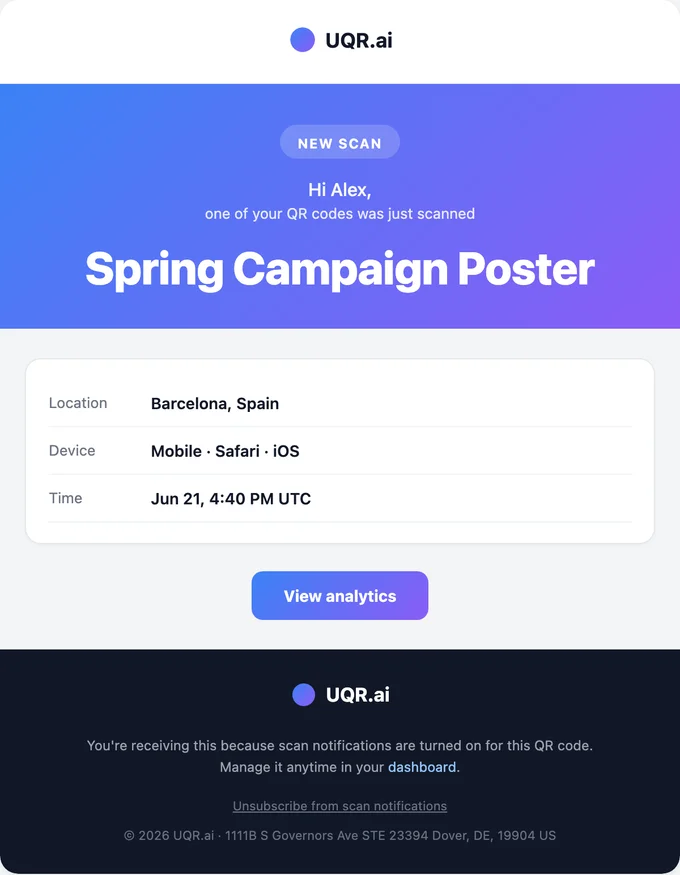
Most people check their QR analytics the way they check the weather: open the app, refresh, and hope something interesting shows up. That works until you have a few codes in the wild and a business to run. Then the dashboard becomes one more tab you forget to open, and the scan that actually mattered — a prospect opening your proposal, a lead scanning your badge — sits unread until Friday, long after it has gone cold.
Scan notifications flip that around. Instead of you going to the data, the data comes to you, by email, on a rhythm you choose. Turn them on for a code and UQR emails you when it gets scanned — the moment it happens, or rolled into a daily or weekly recap. Print the code, switch on alerts, and get back to work. The inbox does the watching.
Choose how often you hear from your codes
Every QR code is different, and so is the right amount of noise. A code scanned twice a quarter deserves a different rhythm than one plastered across a stadium. That is why scan notifications come in three cadences, and you pick one per code:
- Every scan (real-time). An email the moment someone scans, for low-volume, high-value codes where a single scan is a signal worth acting on now.
- Daily summary. One digest per day, per code, sent only on days that had scans. Best for an active campaign you want to watch closely without a play-by-play.
- Weekly summary. One digest per week, per code, sent only in weeks that had scans. Best for steady, ongoing codes you want to keep an eye on without thinking about them.
Notifications are part of Pro, they are off by default, and they are opt-in on each individual code. Nothing starts emailing you until you say so, and turning one code on never touches the others.
Note Cadence is set per code, not per account. You can run a real-time alert on your booth sign, a daily summary on a campaign landing code, and a weekly recap on your evergreen business-card QR — all at the same time. Notifications work on dynamic UQR short-link codes, the same codes you can edit anytime without reprinting.
"Every scan": real-time alerts for hot leads
Some scans matter individually. A vCard on a sales rep's badge. A code on a six-figure proposal. A private invitation, a warranty card, a "scan to talk to us" sticker on a trade-show booth. When one of those gets scanned, someone real just raised their hand — and the faster you know, the warmer the follow-up.
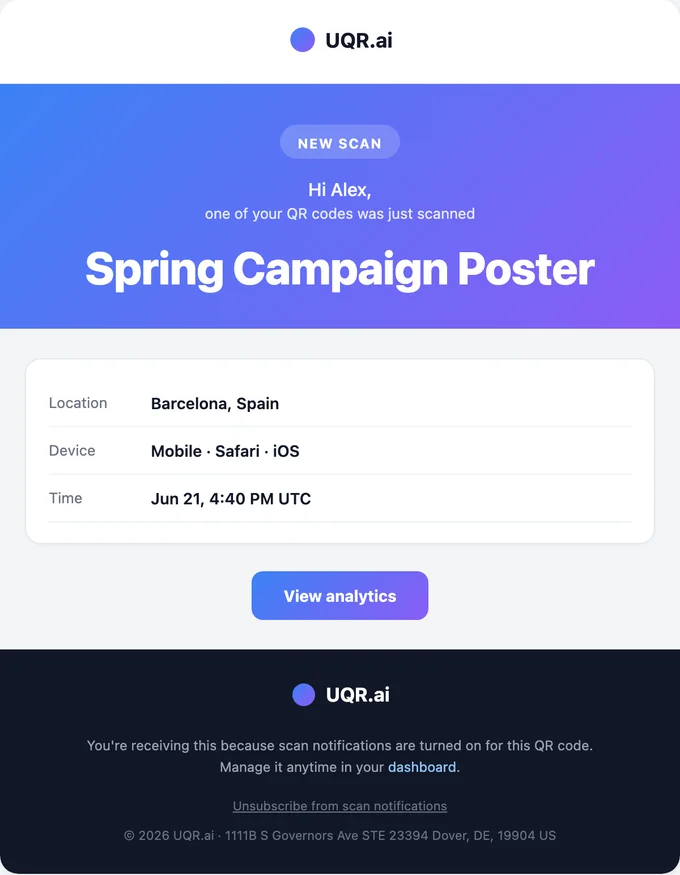
Each "every scan" email is built to be read in two seconds and acted on immediately. It includes:
- The QR code's name, so you know exactly which code fired when you run more than one.
- The scan location, down to city and country, so you can tailor the follow-up.
- The device — mobile or desktop — plus the browser and operating system.
- The time the scan happened.
- A "View analytics" link straight to that code's full report when you want the wider picture.
That last link is the bridge between the alert and the bigger picture. The email tells you a scan happened; one click takes you into the analytics dashboard, where you can see every scan, the geographic heatmap, and the device breakdown in context.
Tip A scan from the city where your conference is happening, on a mobile device, at 2:15 p.m.? That is the badge you just handed someone at the booth. Reply to your own lead-capture thread while they are still standing in the hall.
A worked example: the booth and the badge
Picture a sales rep working a two-day trade show with a "scan to book a demo" sign at the booth and a vCard QR on their badge. Here is how real-time notifications change their day:
- 9:40 a.m., booth sign scanned. The rep is mid-conversation when their phone buzzes. The alert shows a scan from a local mobile device. They glance, nod, and keep talking, knowing the demo request is already in flight.
- 9:41 a.m., follow-up fires. Because the alert names the code and the location, the rep knows it is a live booth visitor, not someone who saved the sign for later. They wave the prospect over before they drift to the next aisle.
- 2:15 p.m., badge vCard scanned. A different alert, a different code name. Someone they met at lunch just saved their contact. The rep sends a "great meeting you" note that afternoon instead of three days later.
- Day two, a desktop scan from out of state. A desktop browser from another region — a colleague of yesterday's contact looking them up from the office. The rep loops in the right account owner the same morning.
- Across both days, no missed scans. Every meaningful touch got a same-hour response, and the rep never once opened the analytics dashboard during the show.
Tip Reserve real-time alerts for codes where every scan is a person worth chasing. To keep a code that suddenly goes viral from flooding your inbox, real-time alerts are throttled to roughly one email every few minutes for high-traffic codes. You still get the signal that it is taking off — just batched into a steady trickle instead of a thousand-message flood.
Daily and weekly summaries: the recap, not the firehose
For most campaigns, you do not need to know about each scan. You need to know how the campaign is doing. That is what the digest cadences are for: they roll every scan over a period into one readable email, so you get the shape of the activity without the noise.
Pick daily when a campaign is live and you are actively steering it — a product launch, an event week, a promotion with a deadline. Pick weekly when a code is part of the furniture: a menu, a Google review card at the counter, a packaging insert, a permanent sign whose job is to keep working quietly while you check in once a week.
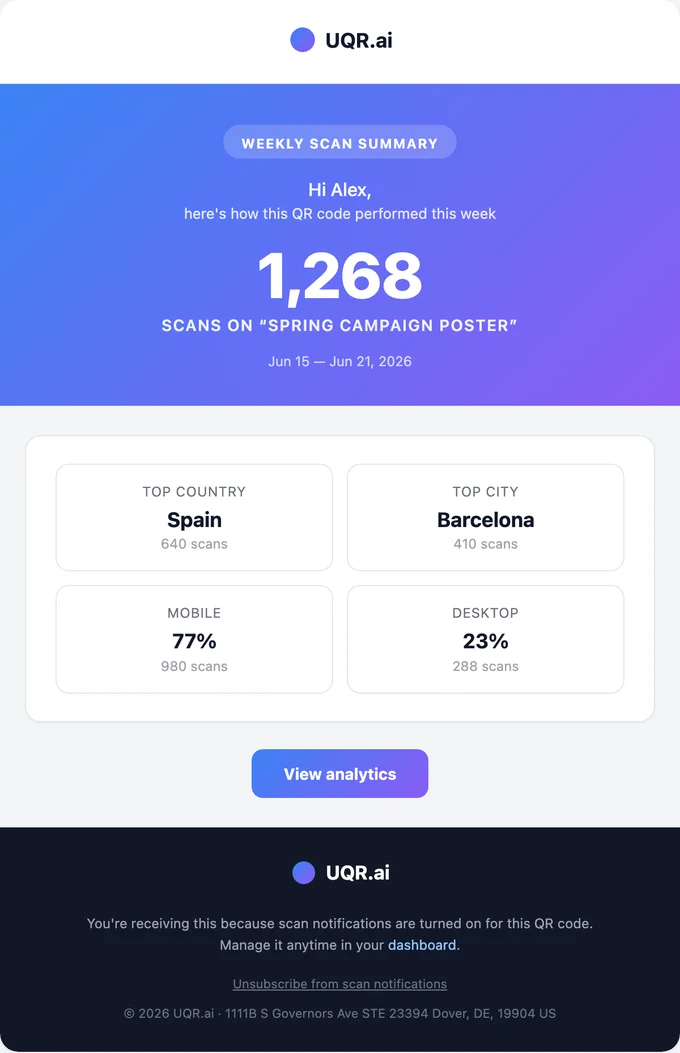
Each digest — daily or weekly — gives you the period at a glance:
- The QR code's name and the date range the recap covers.
- Total scans for the period, the single number you skim for first.
- Top country and top city, so you know where the interest is concentrated.
- The mobile versus desktop split, a quick read on how people are scanning.
And digests are never sent empty. If a code had zero scans in the period, no email goes out — so a full inbox always means activity worth a look, and a quiet inbox means a quiet code. No "you had 0 scans this week" noise. When you want to go deeper than the recap, the full breakdowns are always waiting in your analytics dashboard.
Turn it on (or off) wherever you happen to be
There is one notification control, and it shows up in the three places you already manage your codes — so you never have to go hunting for a settings page:
- While creating or editing a code, in the Link Options panel, alongside the other Pro controls, so you can switch alerts on as you set the code up.
- On the code's detail page, when you are already looking at a specific QR and decide it deserves alerts.
- From the QR list, via the row's "..." menu, for a quick toggle without opening anything.
All three are the same control. Set a cadence in one place and it sticks; change your mind later and flip it from whichever screen you are on. You can toggle notifications off for any code at any time.
Built so the emails are always worth opening
A notification you learn to ignore is worse than no notification. Scan notifications come with guarantees baked in so the signal stays useful and the volume stays sane:
- Real humans only. Bot and crawler traffic is excluded, so an alert always means an actual person scanned your code — not an automated link-preview hitting the URL.
- One-click unsubscribe. Every email has it, and turning a code's alerts off per QR is always one toggle away.
- Bad addresses are skipped. Suppressed and bounced addresses are never mailed, which protects your deliverability and keeps your sender reputation intact.
- Throttling on real-time alerts caps high-traffic codes at about one email every few minutes, so a code that unexpectedly takes off cannot bury your inbox.
- Empty digests are never sent, keeping daily and weekly recaps meaningful.
Note The "real humans only" filter is the same bot exclusion that keeps your analytics honest. Because notifications and scan analytics draw from the same clean scan data, the number in your digest always matches the number on your dashboard.
Free versus Pro
Scan notifications are part of Pro, sitting alongside the rest of the advanced toolkit. Every account still gets scan analytics and unlimited scans, no matter the plan.
| Capability | Free | Pro |
|---|---|---|
| Scan analytics | Basic | Advanced |
| Scan notification emails | Not included | Every scan, daily, or weekly |
| Notification cadence, per code | Not included | Included |
| Bot exclusion and suppression handling | Included | Included |
| Advanced controls | Not included | Password protection, link expiration, scan limits, country-based geolocation redirects |
Notifications round out the Pro controls you already rely on: you can geolocate visitors by country, protect a code with a password, expire it on a date, cap its scans — and now get told the moment those codes are working.
Key takeaways
- Scan notifications email you when a QR code is scanned, in one of three cadences you choose per code: every scan, a daily summary, or a weekly summary.
- Real-time alerts suit low-volume, high-value codes and are throttled to roughly one email every few minutes so a viral code can't flood you; each includes the code name, location, device, browser, OS, time, and a "View analytics" link.
- Daily and weekly digests recap total scans, top country and city, the mobile/desktop split, and the date range — and are never sent for a period with zero scans.
- Turn it on from the same control in three places: the Link Options panel, the code's detail page, or the QR list "..." menu. It is off by default and toggled per code anytime.
- Bots are excluded, suppressed and bounced addresses are skipped, every email has one-click unsubscribe, and digests are never sent empty.
Ready to stop checking and start getting tapped on the shoulder? Create a QR code for free in minutes, explore all features, or upgrade to Pro to unlock scan notifications, advanced analytics, and the full set of advanced controls.